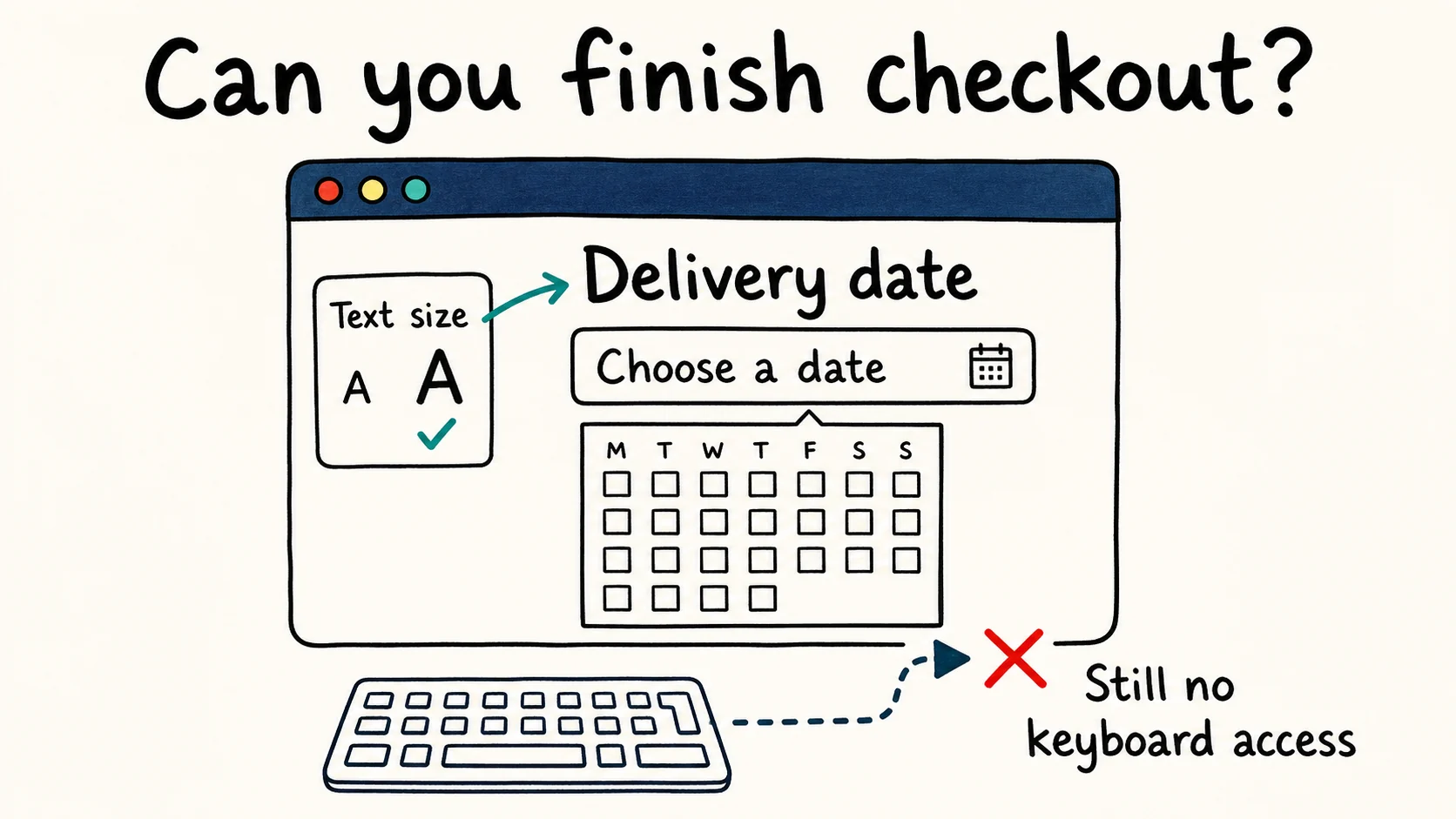
An accessibility overlay is not a complete accessibility fix. If a customer cannot select a delivery date with a keyboard, larger text and a new color scheme still leave them unable to place an order.
Before buying one, ask the vendor to complete your actual checkout, booking form or signup flow using a keyboard and a screen reader. Have them make a mistake in the form and recover from it. A demonstration like that gets beyond the sales promise and shows whether the service works for the people who need it.
What is an accessibility overlay?
An accessibility overlay adds software to a website, usually through a script or plugin. The European Disability Forum and IAAP describe two approaches: a visitor toolbar with controls for text size, contrast or reading aloud, and automated software that attempts to repair accessibility problems in the page.
A toolbar changes the visitor's experience. A repair changes something the site was getting wrong. Check which you are buying.
For example, a text-size control lets a visitor enlarge a form label. Repair software that gives an unnamed field an accurate, programmatically associated label addresses a defect in the form itself. Products often bundle these functions together, so ask the vendor to identify the actual repairs, demonstrate them on your site and distinguish them from optional preferences.
The service behind the software matters, too. If a subscription includes manual testing and developer repairs, ask for those deliverables separately. You should know how much of the result depends on work that happens outside the widget.
Can an overlay make a website WCAG compliant?
Installing an overlay does not, by itself, make a website WCAG conformant. The Web Content Accessibility Guidelines assess the resulting pages and interactions, regardless of which tool produced them.
Conformance covers full pages and complete processes. An inaccessible payment step prevents the purchase journey from conforming, even if the product page works perfectly. These are explicit WCAG conformance requirements.
A tested JavaScript repair can fix a specific defect. That does not establish that a general-purpose script has understood and repaired the whole site. W3C's guidance on evaluation tools is clear that human evaluation is still needed.
Our automated scans have the same limitation. We help you identify detectable failures and build a repair list; a clean report from us does not prove conformance.
Accessibility problems an overlay can leave behind
Use these examples when checking a proposed fix. Each improvement in the left column leaves a separate question about whether the task works.
| Change applied | Check before calling it fixed |
|---|---|
| Larger calendar text | Select, change and confirm a date with a keyboard. |
| A name for a dialog button | Open it, use its controls, close it and check where focus returns. |
| A description for a linked icon | Confirm that the link explains its destination. |
| A readable PDF download link | Check reading order and form controls inside the file. |
A named button can still open a broken dialog
Suppose the repair correctly names the calendar button “Choose delivery date.” A screen reader now announces its purpose, but opening it leaves keyboard focus on the page behind the calendar. The customer knows which control they need and still cannot reach it.
That is an interaction defect. The W3C modal dialog pattern describes the focus and keyboard behavior to check alongside names and roles. Have the developer demonstrate the full sequence, from opening the calendar to returning to the form with a date selected.
Alt text has to explain the image's job
“Tape measure” describes an icon. “Size guide” explains where its link goes. If the icon is the link's only content, the destination is what the shopper needs.
The W3C alt-text decision tree distinguishes images that convey information, perform a function or serve as decoration. Review generated descriptions in that context. A tool recognizing the object correctly has not necessarily chosen the right words for the page.
A page repair does not repair its downloads
Changing a download link does not change the reading order inside its PDF. The document needs its own checks and repairs, as W3C's PDF guidance explains.
Include the files people need to complete a task in your testing scope. An application form is still part of the service after someone downloads it.
What the accessibility community says about overlays
The Overlay Fact Sheet listed 1,031 signatories when we checked on 7 September 2026, including contributors to WCAG, ARIA and HTML and accessibility practitioners from many countries. It rejects claims of automated compliance and advocates repairing problems at their source. The document also collects accounts from assistive-technology users describing interference with navigation and page content.
We agree with its call to repair accessibility problems at their source. We do not recommend buying an overlay on the promise that installing a script will make your site compliant. A vendor should be able to show which barriers its work removes and what still needs fixing.
The EDF and IAAP joint statement identifies related problems: overlays overriding a visitor's settings or interfering with the assistive technology they already use. It acknowledges that individual features help some users, while opposing their use as a substitute for repairing the site.
For your own evaluation, pay attention to unexpected focus changes, extra announcements and settings that override the visitor's choices. People should be able to use the screen reader or browser setup they know, without first troubleshooting your accessibility menu.
ADA, Section 508 and the European Accessibility Act
WCAG is an international technical standard. Legal obligations depend on your services, customers and jurisdiction, so a vendor's generic “compliance” claim needs a more specific answer.
United States — ADA. The Department of Justice's Title III guidance says the ADA applies to the online goods and services of businesses open to the public. State and local governments fall under Title II, with a separate web and mobile app rule that specifies WCAG 2.1 Level AA, subject to its scope, exceptions and compliance dates. Do not treat that government rule as the rule for every private business.
United States — Section 508. Section 508 covers information and communication technology that federal agencies develop, procure, maintain or use. If you supply a federal buyer, establish the applicable procurement requirements and the evidence they expect. An overlay subscription is not a substitute for that evaluation.
European Union — EAA. Requirements under the European Accessibility Act began applying on 28 June 2025 to covered products and services, including consumer e-commerce services. It does not cover every website: scope, transitional provisions and exemptions matter, including the exemption for microenterprises providing services. If you sell into the EU, check the national implementing rules relevant to your service.
For other markets, the W3C laws and policies directory is a starting point for finding local requirements; confirm the current position with the relevant authority. The practical question for a vendor is which obligation its work addresses and what evidence supports that claim.
What did the FTC action against accessiBe establish?
In April 2025, the U.S. Federal Trade Commission announced a final consent order requiring accessiBe to pay $1 million.
The complaint alleged that accessiBe's claims about accessWidget making websites WCAG compliant were false, misleading or unsubstantiated. The final order bars claims that its automated products can make any website compliant, or maintain that compliance over time, unless the company has evidence to support them. It also addresses reviews presented as independent without disclosing material connections.
The order concerns the company's representations; it does not ban accessibility overlays. Buyers should ask for evidence behind a compliance promise and check who paid for a review.
What should you do instead of relying on an overlay?
Our recommendation is to fund repairs to your essential tasks before buying a widget on the promise of compliance. Work through them in this order:
Pick the tasks people need to finish. For a shop, start with finding a product, adding it to the cart and paying. A service business might start with its booking or quote form. Include error recovery: submitting a form successfully is only part of using it.
Scan, then investigate beyond the report. Run automated checks on those pages and combine the findings with manual evaluation using a keyboard, zoom and screen readers. As a first keyboard check, set your mouse aside, use Tab and Shift+Tab to move between controls, and use each control's expected keys to operate it. Leave a required field empty, submit, and try to find and correct the error. Record where you lose your place or cannot continue so a developer can reproduce the problem.
Fix the problem at its source. Repair a missing label in the form component, a failing color in the design system or an unhelpful image description in the content editor. Fixing the shared component or template also prevents the same defect from appearing on the next page built with it. For color repairs, our WCAG contrast guide shows how to choose and test replacement colors.
Retest the whole task. Check the repaired journey, including mistakes and recovery. Involve people with disabilities alongside conformance evaluation to find usability problems a standards review alone can miss. Keep automated checks in the release process and repeat manual checks when important interactions change.
If the budget is tight, reduce the initial scope to one essential journey. A working booking form is a useful result you can verify.
Already have an overlay? Check this before removing it
Find out which parts of your site currently depend on it. Removing the script can bring back defects it was repairing, even if you have good reasons to replace it.
Ask your developer to compare the same tasks on a staging copy, with the overlay enabled and with its script disabled. Closing the toolbar may leave automatic repairs running. Record which labels, interactions and preferences change, then move the useful repairs into your components, templates or content.
Retest those tasks before changing the live site, including any pages the vendor patched individually. This comparison checks your dependency on that integration; it is not a requirement to make every site work with all JavaScript disabled.
Keep an optional preference control if testing shows it helps your visitors and works with their technology. Be clear about what it does, and continue fixing the rest of the site.
Questions to ask an accessibility overlay vendor
Get answers about your site in writing before signing:
- What is covered? Ask for the WCAG version and level, the pages and tasks tested, and exclusions such as PDFs, embedded booking tools and payment screens.
- Who tested it, and how? Request the manual evaluation scope, browser and assistive-technology combinations, and whether people with disabilities took part.
- Can you demonstrate the repair? Give the vendor a task that fails today and ask them to complete it after the proposed fix.
- Who handles the remaining problems? Get an owner, a process and a price for manual repairs.
- What happens after a redesign or cancellation? Establish which fixes persist, which depend on the subscription and who retests changed components.
If a vendor answers with a score or badge, ask again for the task demonstration.
Frequently asked questions
Is every accessibility plugin an overlay?
No. A plugin might help an author add labels, check content before publication or repair a specific component. Examine what it changes and how the result is tested. Being packaged as a plugin tells you little about its effectiveness.
Can AI-generated alt text be useful?
Yes, as a draft to review in context. Check that it conveys the information or link purpose the reader needs, and whether the image needs a description at all. Keep the final wording under editorial control.
What if my website builder will not let me fix a component?
Ask the provider for an accessible version, replace the component or redesign that part of the task. An appointment request form, for example, is an option when the available calendar cannot be made usable. Test the replacement with the people and technology it needs to support.
Is an accessibility scanner enough?
No. A scanner identifies detectable failures; content and interactions also need manual evaluation. Use scan findings to direct repairs, then check that people can finish the tasks that matter.
See which of these failures your own page has
One URL, one scan, and the exact element plus the rule it breaks — no signup needed for the first report.
Run a free scanAccessiLume cites primary standards and published research. Sources checked against W3C, disability advocates and public authorities.
- W3C. Web Content Accessibility Guidelines (WCAG) 2.2 — Conformance Requirements. December 2024.
- W3C Web Accessibility Initiative. Evaluation Tools Overview.
- W3C Web Accessibility Initiative. Dialog (Modal) Pattern. ARIA Authoring Practices Guide.
- W3C Web Accessibility Initiative. An alt Decision Tree. May 2024.
- W3C. PDF3: Ensuring correct tab and reading order in PDF documents.
- European Disability Forum and IAAP. Joint statement on accessibility overlays. May 17, 2023.
- U.S. Federal Trade Commission. FTC Approves Final Order Requiring accessiBe to pay $1 Million. April 22, 2025.
- W3C Web Accessibility Initiative. Involving Users in Evaluating Web Accessibility.
- Overlay Fact Sheet. Community statement and signatories.
- U.S. Department of Justice. Guidance on Web Accessibility and the ADA. Title III guidance for businesses open to the public.
- U.S. Department of Justice. Fact Sheet on the Title II Web and Mobile App Accessibility Rule. State and local governments; includes current compliance dates.
- U.S. General Services Administration. IT Accessibility Laws and Policies. Section508.gov.
- EUR-Lex. Accessibility of products and services. Summary of Directive (EU) 2019/882, the European Accessibility Act.
- W3C Web Accessibility Initiative. Web Accessibility Laws & Policies. International policy directory.